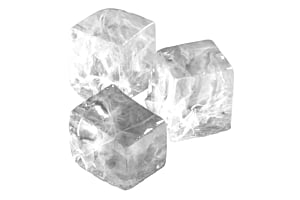
A pile of small, chewable, cylindrical Hoshizaki cubelet ice pieces with a slightly frosted appearance, resting on a reflective surface

When ice keeps your business running, spotting issues early on Hoshizaki units makes a real difference. A sharp decline in output might disrupt workflow, test patience among team members, yet still leave guests unaware, though places like diners, pubs, and motels face the brunt when supply dips. Though it may seem like systems are failing, most triggers turn out to be minor, solvable, given the right clues. Instead of assuming breakdowns, consider small hiccups stacking up behind the scenes.


This guide covers what causes low performance, introduces helpful tools for safe troubleshooting, walks through actions you can take one at a time, yet points out when expert support becomes necessary.


Low ice output? Service slows down. Drinks aren't made fast, and taste slips. Spotting problems early keeps things running - no hiccups, no surprises. Fix it before customers notice.


Shielding performance from decline - scale deposits clog systems, grimy filters choke circulation, and poor air movement strains mechanics. Gradually, power demands climb while parts degrade faster.


Many small issues stem from skipped cleanings or late servicing. When care is overlooked, machines often underperform. Regular upkeep changes that pattern. Sticking to consistent Hoshizaki cleaning helps avoid breakdowns early. Problems fade when attention comes sooner rather than later.


Helpful Tools to Have: Food-safe cleaners and sanitizers

Cleaner meets sanitizer alongside soft brushes, lifting biofilm so freeze cycles regain rhythm. Debris slips away, easing the harvest without fuss or delay.


Stagnant water pressure often means weaker performance. Cloudy ice cubes or sluggish freezing? Swap in a fresh filter - check the water filter collection for one that fits. Sometimes, just switching it out brings everything back up to speed.


A flashlight helps you peer into tight spots where shadows hide details. A towel comes in handy when surfaces are damp or hands need wiping. Instead of skipping steps, a simple screwdriver allows access behind secured covers. Together, they create a barebones kit for peeking at machinery without fuss.


Start by checking the water source. A weak stream usually means trouble ahead. Make sure the valve’s turned on - sometimes it’s just that simple. Look at the line; if it’s bent or twisted, straighten it out. Filters can get gunky over time, so inspect yours closely. When water drags its feet getting through, freezing slows down, and then everything gets thrown off rhythm.


Check the evaporator next. A white, powdery film or lopsided frost often means mineral deposits have formed. Removing this crust helps cooling work better. Freeze cycles get quicker once it's clean.


Open panels need room to breathe - clutter or grime on cooling units holds in warmth, slows performance. Sweep away buildup, leave gaps around components, and keep routes clear so air moves freely.


Check the last time it was cleaned - when sessions get missed, gunk builds up quickly. A deep inside scrub tends to bring things back online quicker than most assume.


Restart the system once filters are cleaned or swapped out. Watch how it runs over the following cycles. Should things stay off, there could be underlying hardware concerns.


Check it once a week. Keep an eye out for sluggish patterns, odd noises, or chunks that never quite freeze. Spotting these hints early means stepping in before output starts slipping more.


Every month, a quick clean helps the evaporator stay free of gunk, so water moves as it should. A glance during upkeep might catch small problems before they grow.


A quick check every few months keeps things running - especially if you're pulling heavy volumes or dealing with mineral-heavy water. Scale buildup can slow things down, so swapping out filters now and then makes sense when conditions are rough.


Six-month maintenance keeps things running - techs peek inside, testing coolant amounts, wiring health, plus system rhythm. Catching small hiccups early means fewer midnight breakdowns.


Ice output dips below normal by over a third - time to call service

If production remains low even after rinsing and checking fluid levels, something inside might be stuck or worn. Get help by visiting the support section online.


Frozen water turns out messy - cloudy, slush-like, or oddly shaped - which usually means something’s off with the cooling system, a faulty valve, or evaporation issues requiring someone skilled to check it.


A machine humming without pause might hide deeper flaws - its constant operation hinting at strain rather than strength. When it refuses to rest, the core could be struggling, misfiring beneath steady noise. That kind of endurance isn't resilience; it's a quiet cry for expert eyes. Only someone trained can trace what’s wrong below the surface.


Faults that keep showing up often trace back to sensors - sometimes it's the control module acting up or some hidden part wearing out, stuff you can't just fix during a regular check.


Visible leaks or pooling water

Water escaping might harm machinery, while hinting at hidden malfunctions within. Get a specialist involved without delay.


Book service or set up PM: visit our service page or message us on our contact page.

Troubleshooting Low Ice Production on Hoshizaki Machines

Intro

If you rely on your unit every day, troubleshooting low ice production on Hoshizaki machines is one of the most important skills to learn. Reduced output can disrupt operations, frustrate staff, and affect customers—especially if your business depends on consistent ice supply. Whether you’re running a café, hotel, bar, or any ice machine for business, knowing where to start can help you diagnose the issue quickly and safely. This guide breaks down why low production happens, what tools you need, and how to follow a simple troubleshooting process.

Why It Matters

Ensures consistent service quality

Low production can lead to longer wait times, warm drinks, or product inconsistency. Understanding the root causes early helps maintain customer satisfaction and operational flow.

Protects your investment

A commercial ice machine works hard every day. Problems like scale, dirty filters, or poor airflow can reduce efficiency, increasing wear and raising energy bills.

Supports preventive service habits

Many production issues are avoidable with a good maintenance schedule and routine Hoshizaki cleaning. Staying ahead of issues keeps the machine running longer and reduces breakdown risk.

Tools

Cleaners and sanitizers

Food-safe cleaner, soft brushes, and sanitizer help remove debris and biofilm inside the machine—common causes of slow ice cycles.

Replacement water filters

A clogged filter restricts water flow. If your ice looks cloudy or production slows, a replacement from /collections/water-filters may resolve the issue quickly.

Basic tools for inspection

A flashlight, towel, and small screwdriver help you inspect panels, water lines, and the evaporator area safely.

Steps

1. Confirm water supply

Low ice production often begins with insufficient water. Check if the supply valve is open, the line is not kinked, and the filter isn’t clogged. Poor flow disrupts both fill and freeze cycles.

2. Inspect the evaporator

Scale buildup reduces heat transfer, causing longer cycles. If the evaporator plates appear white, chalky, or uneven, it’s time for descaling and detailed cleaning.

3. Check airflow and ventilation

If the condenser gets too warm, the machine can’t make ice efficiently. Remove dust from air vents, ensure nothing blocks the airflow, and confirm the unit meets clearance requirements.

4. Review cleaning history

If routine Hoshizaki cleaning has been skipped, biofilm or debris may be slowing production. A full clean can restore performance quickly.

5. Reset the machine

After cleaning or filter replacement, run a reset. If production doesn’t normalize within a cycle or two, deeper mechanical issues may be involved.

Frequency

Weekly checks

Look for slow cycles, odd noises, or partially formed ice. These early indicators help you catch problems before they grow.

Monthly cleaning

Light cleaning and inspection keep the evaporator clear and water flow steady. This also helps you track usage patterns.

Quarterly filter replacement

Heavy-use businesses or poor water quality may require more frequent filter swaps. Regular changes prevent slowdowns caused by scale or debris.

Semiannual preventive service

A trained technician can check refrigerant levels, inspect electrical components, and ensure the system is running at design efficiency. These preventive service tips help prevent outages.

When to Call Service

Production drops by more than 30%

If ice output stays low even after cleaning and checking water flow, a technician should diagnose deeper mechanical issues. Visit our service page for help.

You see ice forming incorrectly

Slushy, cloudy, or incomplete cubes may signal evaporator, water valve, or refrigeration issues.

Machine runs continuously

A machine that never cycles off might be compensating for inefficiency—this often requires professional inspection.

Recurring error codes

Repeated error codes indicate sensor, control board, or mechanical problems that basic cleaning can’t fix.

Leaks or pooling water

Leaks can damage surrounding equipment and usually require immediate expert attention.

Book service or set up PM: visit our service page or message us on our contact page.